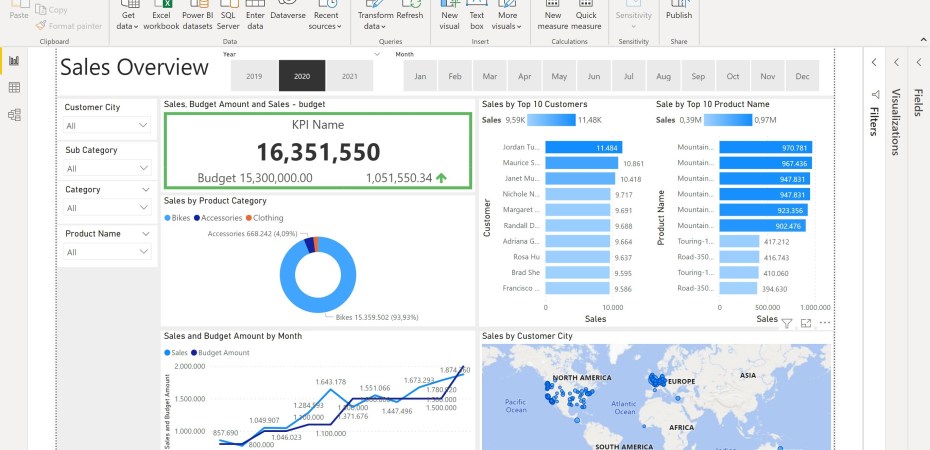
In this project, i started with business requests, then cleansed and transformed data with SQL, extracted them into table, built the model with dimension and fact tables in Power Query. Finally, creating Dashboard according to the users’ needs.
Business Demand Overview
- Value of Change: Visual Dashboards and improve sales reporting
- Necessary System: Power BI, CRM System that uses SQL
- Additional relevant Information: Budgets have been delivered in Excel for 2021
User request:
| No | Role | Request | User Value | Acceptance Criteria |
| 1 | Sales Manager | To get Dashboard overview of internet sales | Can follow better which customers and the best seller products | Power BI Dashboard which updates data once a day |
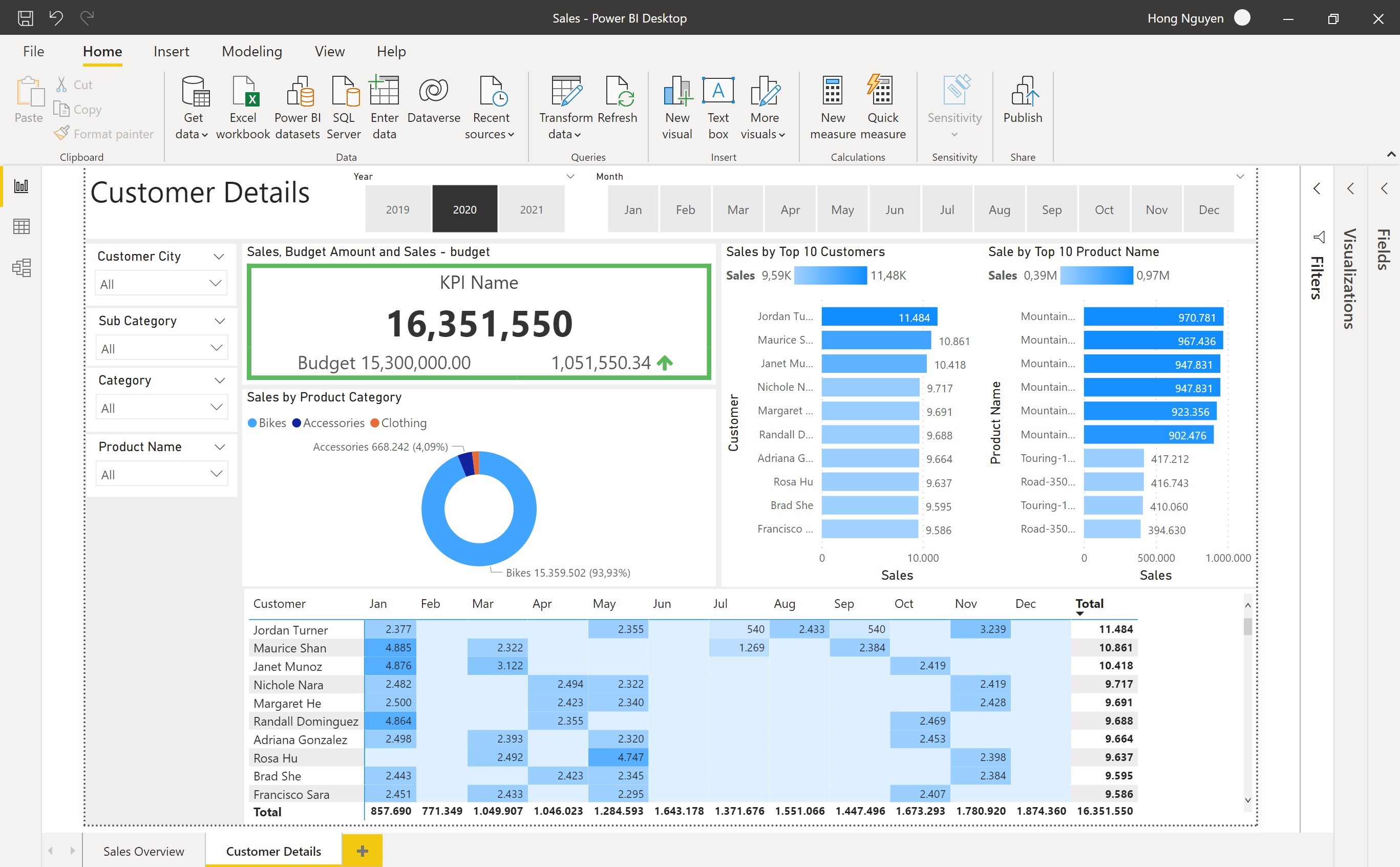
| 2 | Sales Representative | A detailed overview of internet sales per customer | Can follow up my customers who buy the most and who we can sell more | Power BI Dashboard which allows me to filter data for each customer |
| 3 | Sales Representative | A detailed overview of internet sales per product | Can follow up my Products who buy the most | Power BI Dashboard which allows me to filter for each Product |
| 4 | Sales Manager | A dashboard overview of internet sales | Follow sales over time against budget in current year, and look 2 years back. | A Power Bi dashboard with graphs and KPIs comparing against budget. |
Data Cleansing & Transformation with SQL
In this step, i prepared the necessary tables on micro-level, extracted from SQL after that and implemented an excel file named Budget. The code SQL is made more cleaned with codebeautify:
DIM_Calendar
--cleansed DIM Date Table
SELECT
[DateKey],
[FullDateAlternateKey] as Date,
--,[DayNumberOfWeek]
[EnglishDayNameOfWeek] as Day,
--,[SpanishDayNameOfWeek]
--,[FrenchDayNameOfWeek]
--,[DayNumberOfMonth]
--,[DayNumberOfYear]
[WeekNumberOfYear] as WeekNr,
[EnglishMonthName] as Month,
LEFT([EnglishMonthName],3) as MonthShort,
--,[SpanishMonthName]
--,[FrenchMonthName]
[MonthNumberOfYear] as MonthNo,
[CalendarQuarter] as Quarter,
[CalendarYear] as Year
--,[CalendarSemester]
--,[FiscalQuarter]
--,[FiscalYear]
--,[FiscalSemester]
FROM
[AdventureWorksDW2019].[dbo].[DimDate]
WHERE CalendarYear >= 2019
DIM_Customers
SELECT
c.[CustomerKey] as CustomerKey,
      --,[GeographyKey]
      --,[CustomerAlternateKey]
      --,[Title]
 c.firstname as [First Name],
      --,[MiddleName]
 c.lastname as [Last Name],
 c.firstname + ' ' + LastName as [Full Name],
 --Combined first and last name
      --,[NameStyle]
      --,[BirthDate]
      --,[MaritalStatus]
      --,[Suffix]
		--c.gender as test,
	 CASE c.gender WHEN 'M' THEN 'Male' when 'F' THEN 'Female'
	 END AS Gender,

      --,[EmailAddress]
      --,[YearlyIncome]
      --,[TotalChildren]
      --,[NumberChildrenAtHome]
      --,[EnglishEducation]
      --,[SpanishEducation]
      --,[FrenchEducation]
      --,[EnglishOccupation]
      --,[SpanishOccupation]
      --,[FrenchOccupation]
      --,[HouseOwnerFlag]
      --,[NumberCarsOwned]
      --,[AddressLine1]
      --,[AddressLine2]
      --,[Phone]
	  c.datefirstpurchase as DateFirstPurchase,
      --,[CommuteDistance]
	  g.city AS [Customer City]
	  --Join in customer city from geography table
  FROM [AdventureWorksDW2019].[dbo].[DimCustomer] as c
  LEFT JOIN dbo.DimGeography AS g ON g.GeographyKey = c.GeographyKey
  ORDER BY
  CustomerKey asc
  --Ordered List by CustomerKey
DIM_Products
--Cleansed Dim_Products Table
SELECT
p.[ProductKey],
p.[ProductAlternateKey] as ProductItemCode,
      --,[ProductSubcategoryKey]
      --,[WeightUnitMeasureCode]
      --,[SizeUnitMeasureCode]
 p.[EnglishProductName] as [Product Name],
 ps.EnglishProductSubcategoryName as [Sub Category],
 --Joined in from Sub Category Table
 pc.EnglishProductCategoryName  as [Product Category],
 --Joined in from Category Table
      --,[SpanishProductName]
      --,[FrenchProductName]
      --,[StandardCost]
      --,[FinishedGoodsFlag]
p.[Color] as [Product Color],
      --,[SafetyStockLevel]
      --,[ReorderPoint]
      --,[ListPrice]
 p.[Size] as [Product Size],
      --,[SizeRange]
      --,[Weight]
      --,[DaysToManufacture]
 p.[ProductLine] as [Product Line],
      --,[DealerPrice]
      --,[Class]
      --,[Style]
p.[ModelName] as [Product Model Name],
      --,[LargePhoto]
p.[EnglishDescription] as [Product Description],
      --,[FrenchDescription]
      --,[ChineseDescription]
      --,[ArabicDescription]
      --,[HebrewDescription]
      --,[ThaiDescription]
      --,[GermanDescription]
      --,[JapaneseDescription]
      --,[TurkishDescription]
      --,[StartDate]
      --,[EndDate]

ISNULL (p.Status,'OutDated') as [Product Status]
  FROM [AdventureWorksDW2019].[dbo].[DimProduct] as p
  LEFT JOIN dbo.DimProductSubcategory as ps ON ps.ProductSubcategoryKey =p.ProductSubcategoryKey
  LEFT JOIN dbo.DimProductCategory as pc ON pc.ProductCategoryKey = ps. ProductCategoryKey
  ORDER BY
  p.ProductKey asc
FACT_InternetSales
--CLEANSED FACT_InternetSales table
SELECT
[ProductKey],
[OrderDateKey],
[DueDateKey],
[ShipDateKey],
[CustomerKey],
      --,[PromotionKey]
      --,[CurrencyKey]
      --,[SalesTerritoryKey]
 [SalesOrderNumber],
      --,[SalesOrderLineNumber]
      --,[RevisionNumber]
      --,[OrderQuantity]
      --,[UnitPrice]
      --,[ExtendedAmount]
      --,[UnitPriceDiscountPct]
      --,[DiscountAmount]
      --,[ProductStandardCost]
      --,[TotalProductCost]
[SalesAmount]
      --,[TaxAmt]
      --,[Freight]
      --,[CarrierTrackingNumber]
      --,[CustomerPONumber]
      --,[OrderDate]
      --,[DueDate]
      --,[ShipDate]
  FROM [AdventureWorksDW2019].[dbo].[FactInternetSales]
  where LEFT (OrderDateKey, 4) >= YEAR(GETDATE()) -2
  --ensure we always bring only 2 years of date from current database system time.
  order by
  OrderDateKey asc
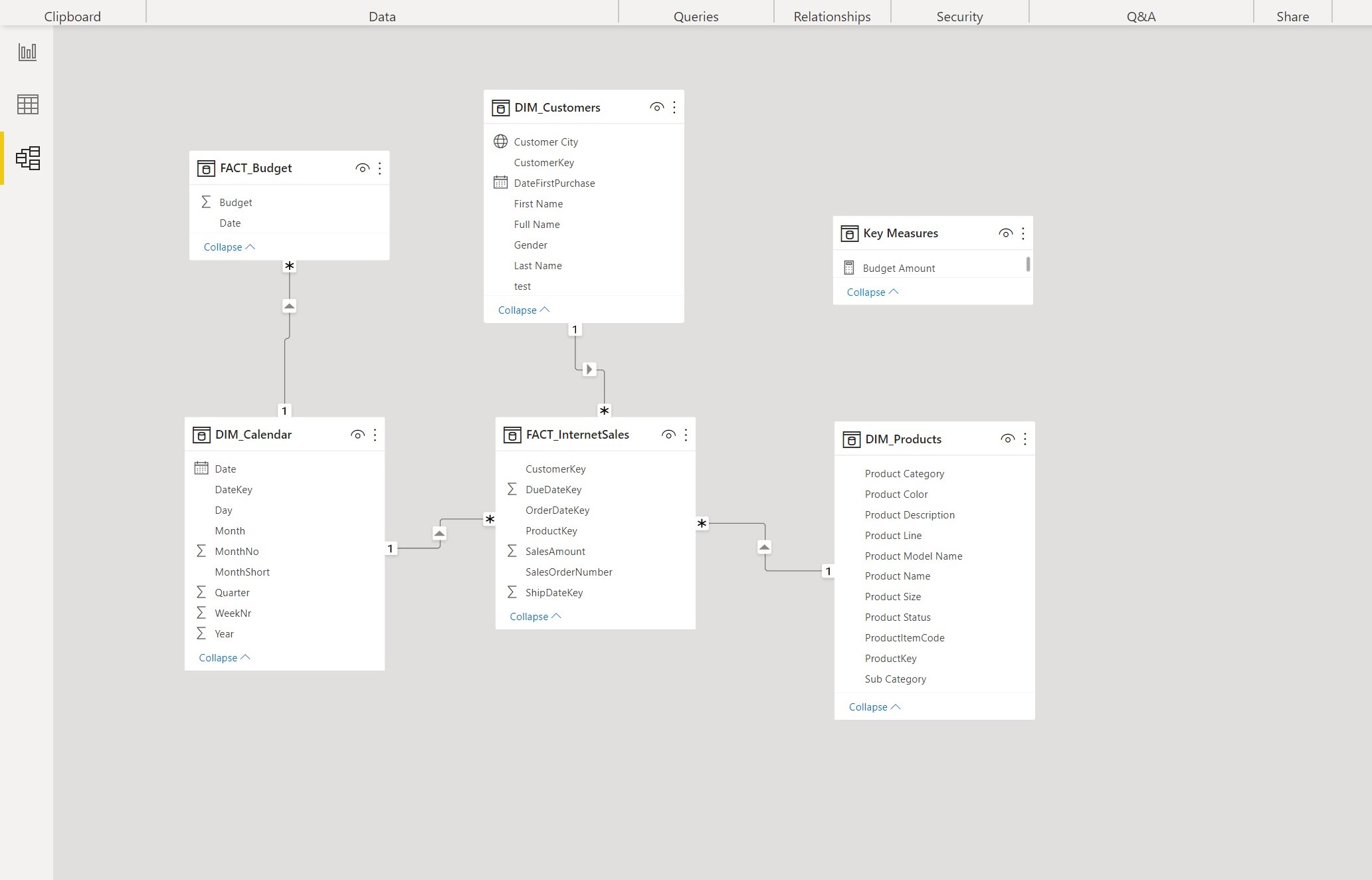
Build Data Model
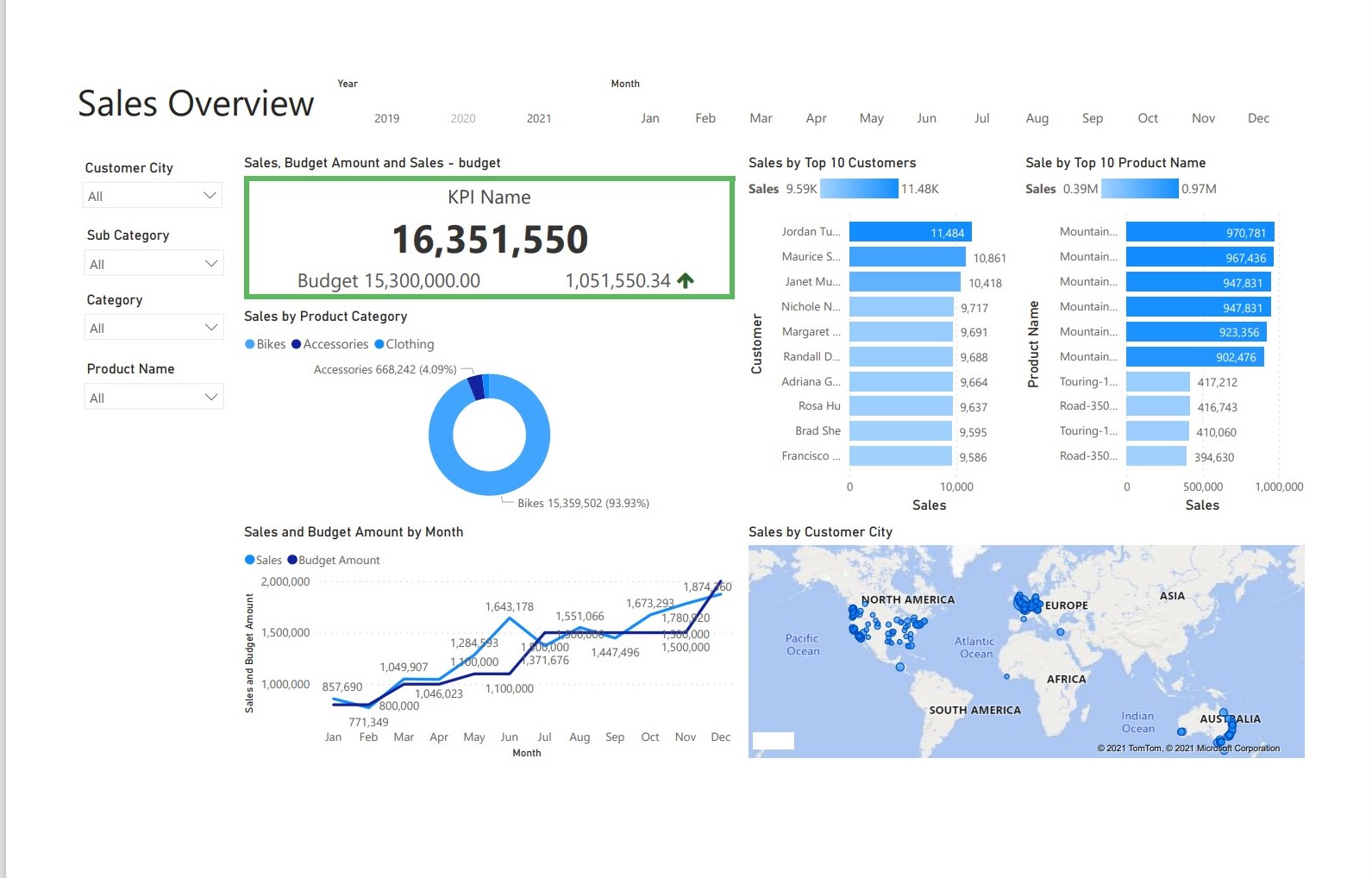
Sales Management Dashboard with Power BI
 Hong Nguyen
[…] started a little bit differently from the project Sales Management Analysis. Instead of beginning with the user requests, i started with data exploration to see what […]
LikeLike